A client-server architecture made up of clients, servers, and resources, with requests managed through HTTP.
Stateless
Stateless client-server communication, meaning no client information is stored between get requests and each request is separate and unconnected.
Cache
Cacheable data that streamlines client-server interactions.
Uniform Interface
A uniform interface between components so that information is transferred in a standard form.
This requires that:
resources requested are identifiable and separate from the representations sent to the client.
resources can be manipulated by the client via the representation they receive because the representation contains enough information to do so.
self-descriptive messages returned to the client have enough information to describe how the client should process it.
hypertext/hypermedia is available, meaning that after accessing a resource the client should be able to use hyperlinks to find all other currently available actions they can take.
Layered System
A layered system that organizes each type of server (those responsible for security, load-balancing, etc.) involved the retrieval of requested information into hierarchies, invisible to the client.
Code-on-demand (optional)
The ability to send executable code from the server to the client when requested, extending client functionality.
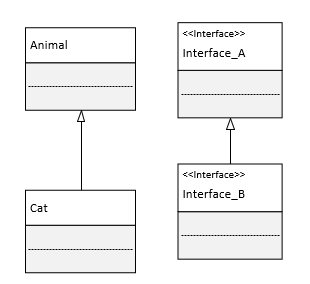
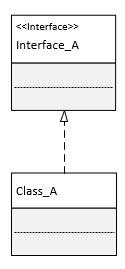
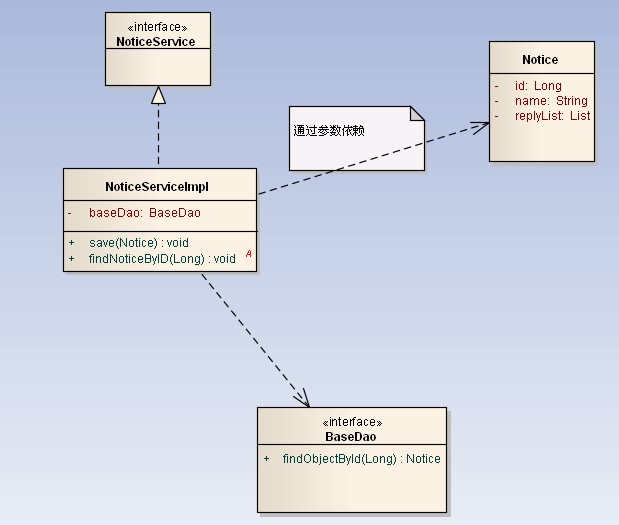
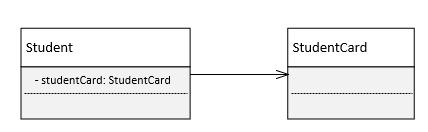
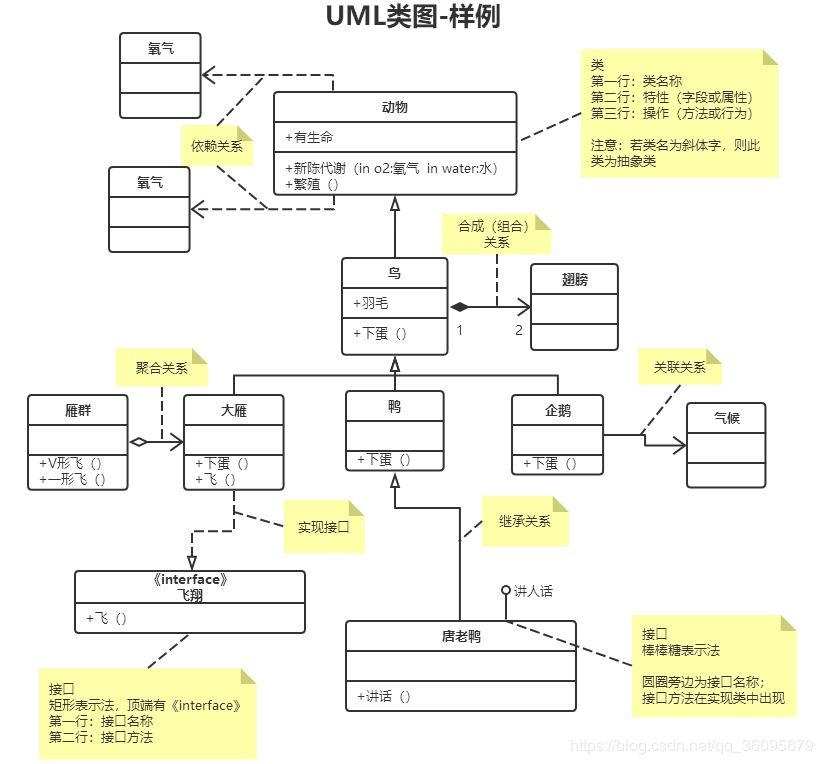
The UML Class diagram is a graphical notation used to construct and visualize object oriented systems. A class diagram in the Unified Modeling Language (UML) is a type of static structure diagram that describes the structure of a system by showing the system’s:
classes
their attributes
operations (or methods)
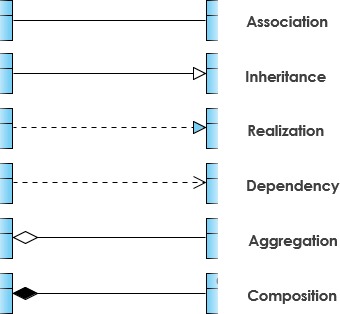
and the relationships among objects.
UML Class Notation
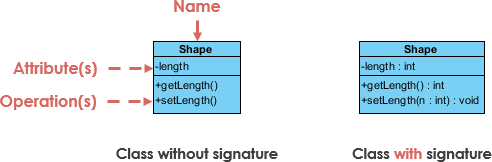
A class represent a concept which encapsulates state (attributes) and behavior (operations). Each attribute has a type. Each operation has a signature. The class name is the only mandatory information.
Class Visibility
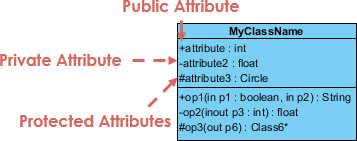
The +, - and # symbols before an attribute and operation name in a class denote the visibility of the attribute and operation.
+ denotes public attributes or operations
- denotes private attributes or operations
# denotes protected attributes or operations
Parameter Directionality
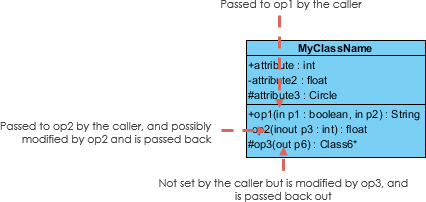
Each parameter in an operation (method) may be denoted as in, out or inout which specifies its direction with respect to the caller. This directionality is shown before the parameter name.
Perspectives of Class Diagram
The choice of perspective depends on how far along you are in the development process. During the formulation of a domain model, for example, you would seldom move past the conceptual perspective. Analysis models will typically feature a mix of conceptual and specification perspectives. Design model development will typically start with heavy emphasis on the specification perspective, and evolve into the implementation perspective.
A diagram can be interpreted from various perspectives:
Conceptual: represents the concepts in the domain
Specification: focus is on the interfaces of Abstract Data Type (ADTs) in the software
Implementation: describes how classes will implement their interfaces
The perspective affects the amount of detail to be supplied and the kinds of relationships worth presenting. As we mentioned above, the class name is the only mandatory information.
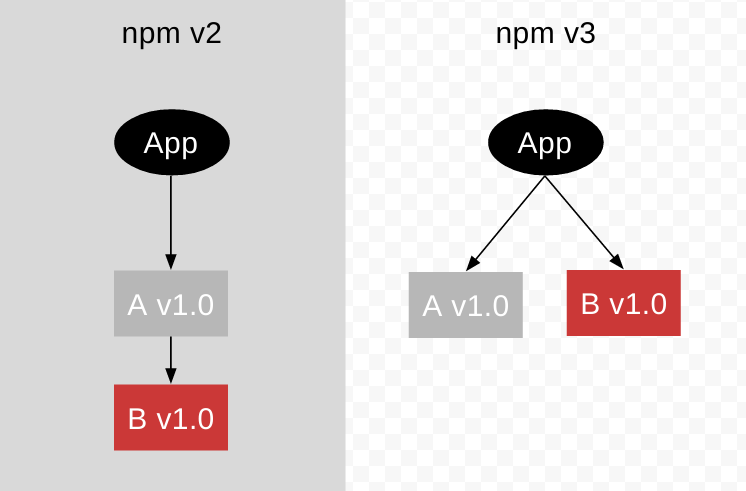
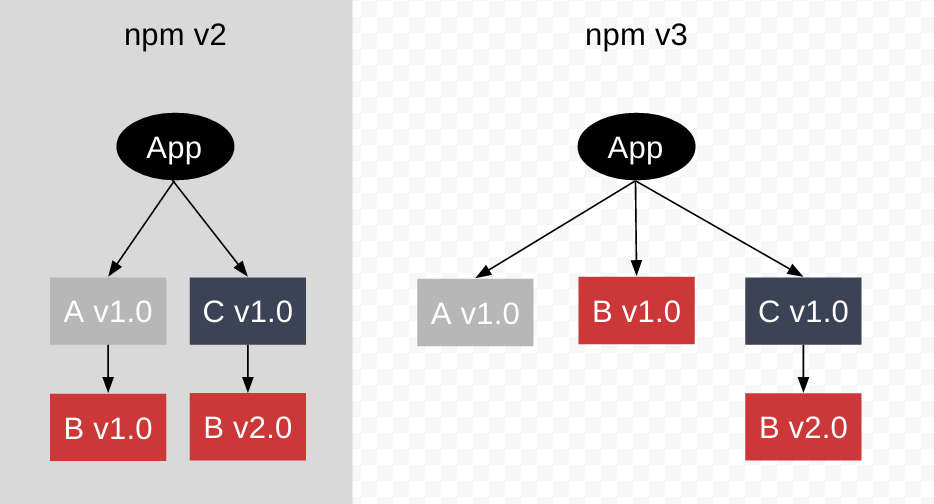
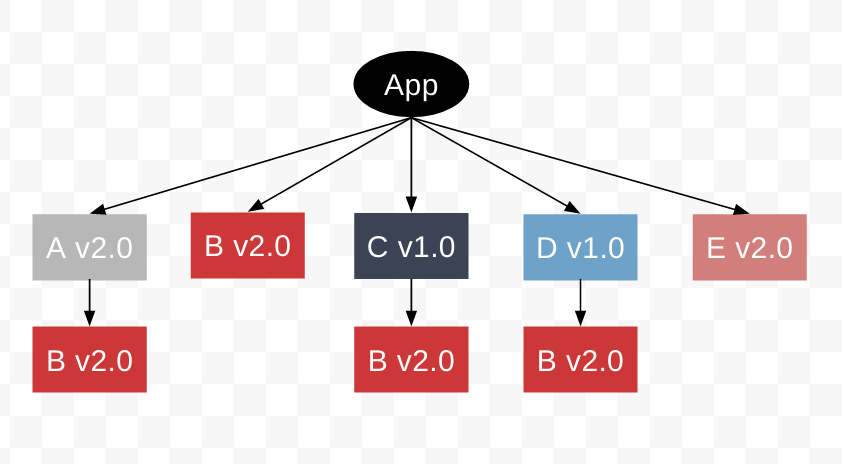
While npm2 installs all dependencies in a nested way, npm3 tries to mitigate the deep trees and redundancy that such nesting causes. npm3 attempts this by installing some secondary dependencies (dependencies of dependencies) in a flat way, in the same directory as the primary dependency that requires it.
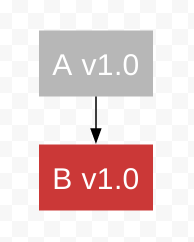
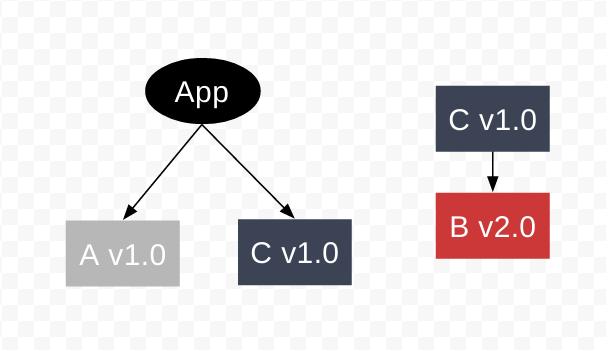
Imagine we have a module, A. A requires B.
Now, let’s create an application that requires module A.
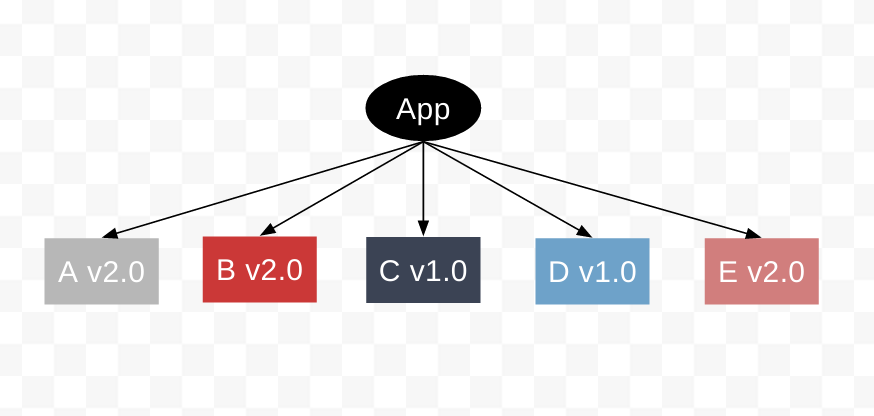
Now, let’s say we want to require another module, C. C requires B, but at another version than A.
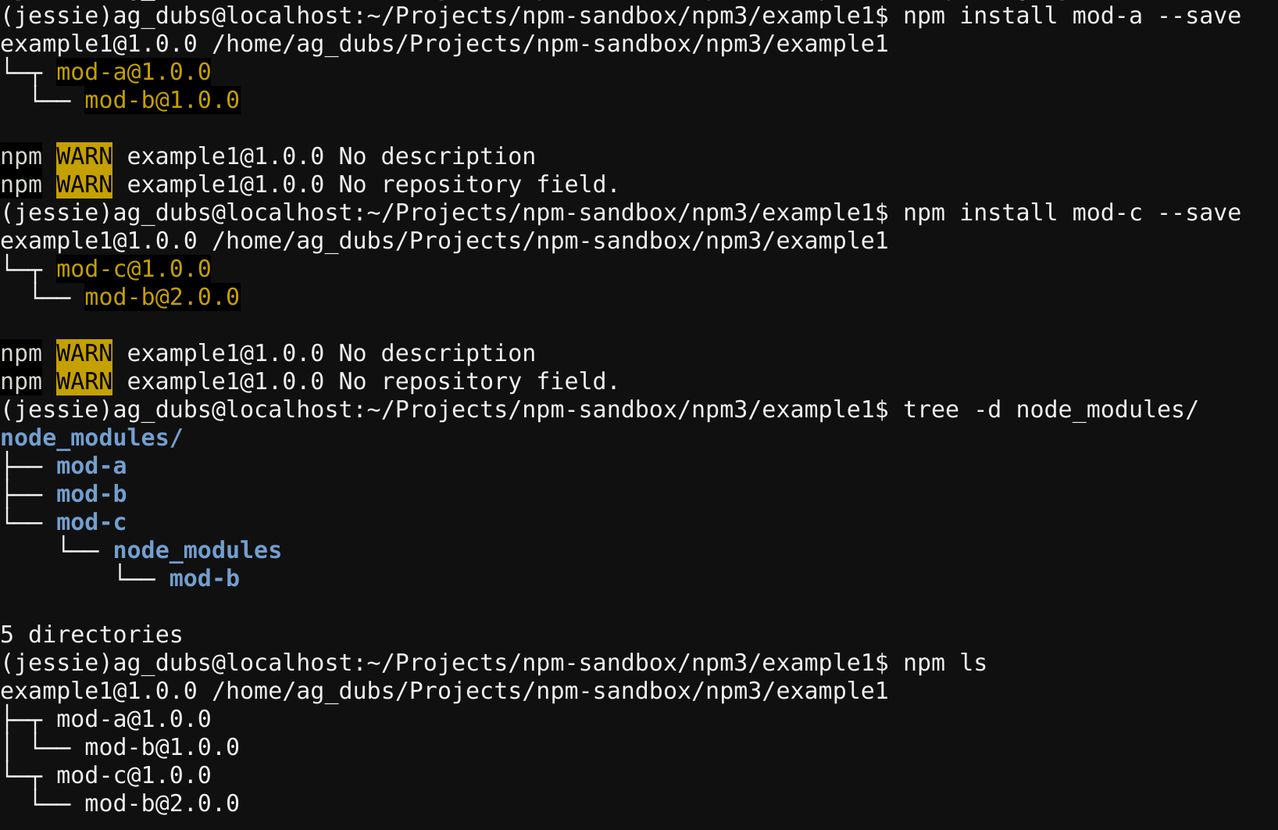
However, since B v1.0 is already a top-level dep, we cannot install B v2.0 as a top level dependency. npm v3 handles this by defaulting to npm v2 behavior and nesting the new, different, module B version dependency under the module that requires it – in this case, module C.
Noted that you can list the dependencies and still see their relationships using npm ls.
If you want to just see your primary dependencies, you can use:
At a high level, npm is not too dissimilar from other package managers for programming languages: packages depend on other packages, and they express those dependencies with version ranges. npm happens to use the semver versioning scheme to express those ranges, but the way it performs version resolution is mostly immaterial; what matters is that packages can depend on ranges rather than specific versions of packages.
Npm installs a tree of dependencies. That is, every package installed gets its own set of dependencies rather than forcing every package to share the same canonical set of packages.
For example, consider two packages, foo and bar. Each of them have their own set of dependencies, which can be represented as a tree:
1
2
3
4
5
6
7
foo
├── hello ^0.1.2
└── world ^1.0.7

bar
├── hello ^0.2.8
└── goodbye ^3.4.0
Most package managers (including RubyGems/Bundler, pip, and Cabal) would simply barf here, reporting a version conflict. This is because, in most package management models, only one version of any particular package can be installed at a time.
In contrast, npm has a somewhat easier job: it’s totally okay with installing different versions of the same package because each package gets its own set of dependencies. In the aforementioned example, the resulting directory structure would look something like this:
Extremely simple model but get pretty messy quickly.
Notably,the directory structure very closely mirrors the actual dependency tree. The above diagram is something of a simplification: in practice, each transitive dependency would have its own node_modules directory and so on, but the directory structure can get pretty messy pretty quickly.
Avoid “Dependency Hell”.
The npm model of package management is more complicated than that of other languages, but it provides a real advantage: implementation details are kept as implementation details. In other systems, it’s quite possible to find yourself in “dependency hell”, when you personally know that the version conflict reported by your package manager is not a real problem, but because the package system must pick a single canonical version, there’s no way to make progress without adjusting code in your dependencies. This is extremely frustrating.
Cons
Larger code size. Worse performance.
Given the potential for many, many copies of the same package, all with different versions. An increase in code size can often mean more than just a larger program—it can have a significant impact on performance. Larger programs just don’t fit into CPU caches as easily, and merely having to page a program in and out can significantly slow things down. That’s mostly just a tradeoff, though, since you’re sacrificing performance, not program correctness.
Dependency isolation can affect cross-package communication.
PeerDependency: Rather than getting its own copy of a peer dependency, a package expects that dependency to be provided by its dependent.
The peerDependencies requires npm v7. For npm >= 3 and npm <= 6, peerDependencies can be declared but will not be automatically checked and installed. That is to say, to leverage the peerDependencies feature, we will need to migrate to npm v7 as well as requiring user to update to npm v7.
Node:
LTS: 14.16.0 (includes npm 6.14.11)
Current: 15.10.0 (includes npm 7.5.3)
Though node use npm v7 as the current version, the majority will be using npm v6 in 2021. Consider the population, asking user to update to npm v7 adds a new pre-requisite.